Home › ConveyPrizym › CAD Connector
Put the 911 Call Summary in Your CAD Record
CAD Connector writes a summary of the 911 call into your CAD record when the call ends. You decide what goes in, call flow by call flow, so dispatchers read the call instead of replaying it.
Works with about 65% of CAD vendors, including CentralSquare, Motorola PremierOne, and Tyler New World.
- Dispatchable address
- Where to send help
- Call type
- Medical, fire, police, or your own types
- Description
- What was reported
- Call summary
- Written into the narrative when the call ends
- Other details
- Only what your agency maps for that call flow
Every word typed is a word not heard
A call-taker listens, types, and talks at the same time. The details that matter most, like a cross street, a weapon, or a medical history, get typed into CAD while the caller is still talking. Some get missed. Some get typed twice.
Later, a dispatcher or a supervisor who needs the full story has to replay the audio to get it.
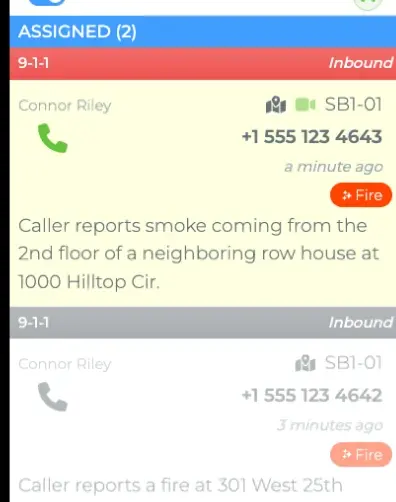
From the last word to the CAD record
CAD Connector is the part of ConveyPrizym that writes to and reads from your computer-aided dispatch system. It can add a summary of a 911 call to the incident in CAD, create a new call for service from an automated source, and follow incidents so ConveyPrizym stays in step with dispatch.
The call comes in
The call-taker answers and stays with the caller. ConveyPrizym writes down the call as it happens.
The summary builds while they talk
Who is calling, whether it's medical, fire, or police, and what happened fill in as the caller says them.
Your mapping decides what's written
When the call ends, CAD Connector checks your agency's mapping for that call flow and writes what you chose into the incident.
Dispatch reads it in CAD
The dispatcher opens the incident and reads the summary. Every summary is also archived, so QA and records requests start from a document.
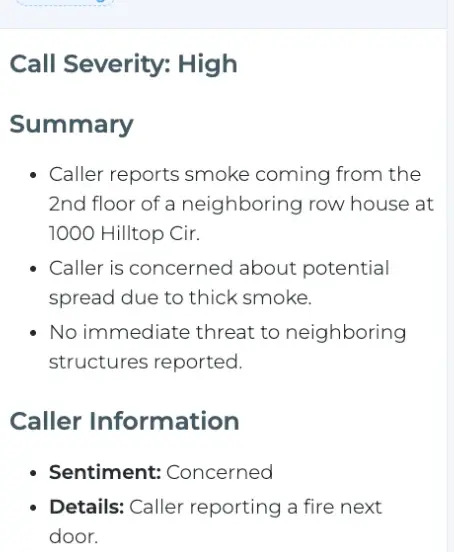
Nothing goes into CAD that your agency hasn't chosen.
What CAD Connector writes is mapped by your agency, one call flow at a time. Some centers want only the call summary in the narrative. Others add more, like a note that the caller was in distress.
- Your CAD stays the recordDispatchers keep working where they already work.
- Your administrator sets the mappingCall flow by call flow, field by field.
- Your CAD isn't replacedCAD Connector comes with ConveyPrizym Pro and Premium.
Works with about 65% of CAD vendors
Including the CAD platforms most large agencies run.
- CentralSquareEnterprise CAD · OSPS · TC CAD
- Motorola SolutionsPremierOne CAD
- Tyler TechnologiesNew World CAD
- OctaveI/CAD · OnCall
- InforEnRoute
- Keystone Public SafetyCAD
- Mark43In development
- Motorola FLEXIn development
Don't see your CAD? Ask us in a demo.
Routine reports, turned into CAD incidents
Some calls for service never start as a phone call. CAD Connector can take an automated report and create the incident for you, with a person in the loop.
A report arrives
Like a tow company fax, the kind of routine report someone used to retype by hand.
A person checks it
Your staff confirm the details before anything goes to CAD.
A call for service in CAD
Created with a dispatchable address, call type, and description.
The same summary, whatever language the caller speaks
ConveyPrizym translates and interprets the call as it happens, so a caller's language doesn't keep the details out of the record.
- The caller, in SpanishHay humo en la cocina. Mi hijo está adentro.
- ConveyPrizymTranscript
Hay humo en la cocina. Mi hijo está adentro.
TranslationThere's smoke in the kitchen. My son is inside.
- The call-takerReads it in English while the caller is still talking, and asks the next question.
- The CAD recordWhen the call ends, the summary is written into the incident.Call summary
EspañolTiếng ViệtالعربيةKreyòl ayisyen中文Русский한국어PortuguêsFrançaisSoomaali
Illustration, not a real call. How ConveyPrizym handles language
Built for everyone who touches the record
Call-takers
Stay with the caller instead of typing. Details are captured as they're said.
Dispatchers
Read the call in CAD, where they already work, and get units moving sooner.
Supervisors and QA
Start a review or a records request from a written summary, not an audio file.
CAD administrators
Decide what gets written, call flow by call flow.
PSAP directors
Add the call to the record without replacing the CAD you run.
Summary in your record, not data between agencies
| CAD Connector | CAD-to-CAD exchange | |
|---|---|---|
| What moves | The content of the 911 call, summarized | Incidents and units between agencies |
| Where it goes | Your own CAD record | Another agency's CAD |
| Who it helps first | Your call-taker and dispatcher | Neighboring agencies and mutual aid |
| Who decides what's sent | Your agency, per call flow | Set by the exchange agreement |
Swipe the table sideways to compare.
CAD Connector questions
What is CAD Connector?
The part of ConveyPrizym that writes to and reads from your CAD, including putting the 911 call summary in the record.
Does it change our CAD?
No. Your CAD stays the record, and your agency maps what CAD Connector writes.
Do dispatchers need a new screen?
No. The summary lands in the CAD record, where dispatchers already work.
What goes into the record?
What your agency maps, per call flow. A new call carries at least a dispatchable address, call type, and description.
Is it included in ConveyPrizym?
Yes, in both Pro and Premium.
Who is CAD Connector for?
911 centers that run ConveyPrizym and want what was said on the call to reach the CAD record without a call-taker retyping it. CAD Connector sits between the two systems: ConveyPrizym captures and summarizes the call, CAD Connector writes the fields your agency has mapped into the incident, and your CAD stays the system your dispatchers work in. It fits best where call-takers are typing while the caller is still talking, and where dispatchers or reviewers end up replaying audio to get the full story.
See a call land in CAD
A demo runs a call from the first ring to the CAD record.
More from ConveyPrizym: Radio ConveyConnect Text-to-911 Everything in ConveyPrizym The Prizym partnership